
Booking a cleaning should leave you with a clear plan: which property is being cleaned, what the visit includes, when the team can get in, and where to find the report afterward. The MyJaxCleaning customer portal brings those details together for Jacksonville-area owners, rental hosts, and customers with more than one property.
You can explore the interactive portal before becoming a customer. The tour uses a fictional property and illustrative reports, so you can try the views without creating a booking or making a payment. Here is how the real customer experience works.
Start with the property and the right cleaning service
A new property begins with a quote request. Share the address, room and bed setup, size, and the work you need. A vacation-rental turnover has different requirements from a move-out clean or a regular home cleaning, so choosing the right service helps us review the scope.
For turnovers, the approved property plan establishes the cleaning scope and price. It also records whether you are supplying suitable clean linens or choosing our optional linen service. Guest essentials are included only when listed in the quote. Review these details and the agreement before booking; an estimate alone does not reserve a cleaning visit.
Have several properties? Keep each home separate. Give each a recognizable name, confirm its address, and add its own setup and photos. That helps you choose the correct home when booking and keeps the right price, calendar, and visit history together.
Choose a date with the property’s plan already in place
Once a turnover property is approved, select it in Book a turnover. The portal shows that home’s details and approved price. Choose an available cleaning date and window, review the linen option, and check the total before confirming. Manually booked turnovers use the checkout shown for that booking.
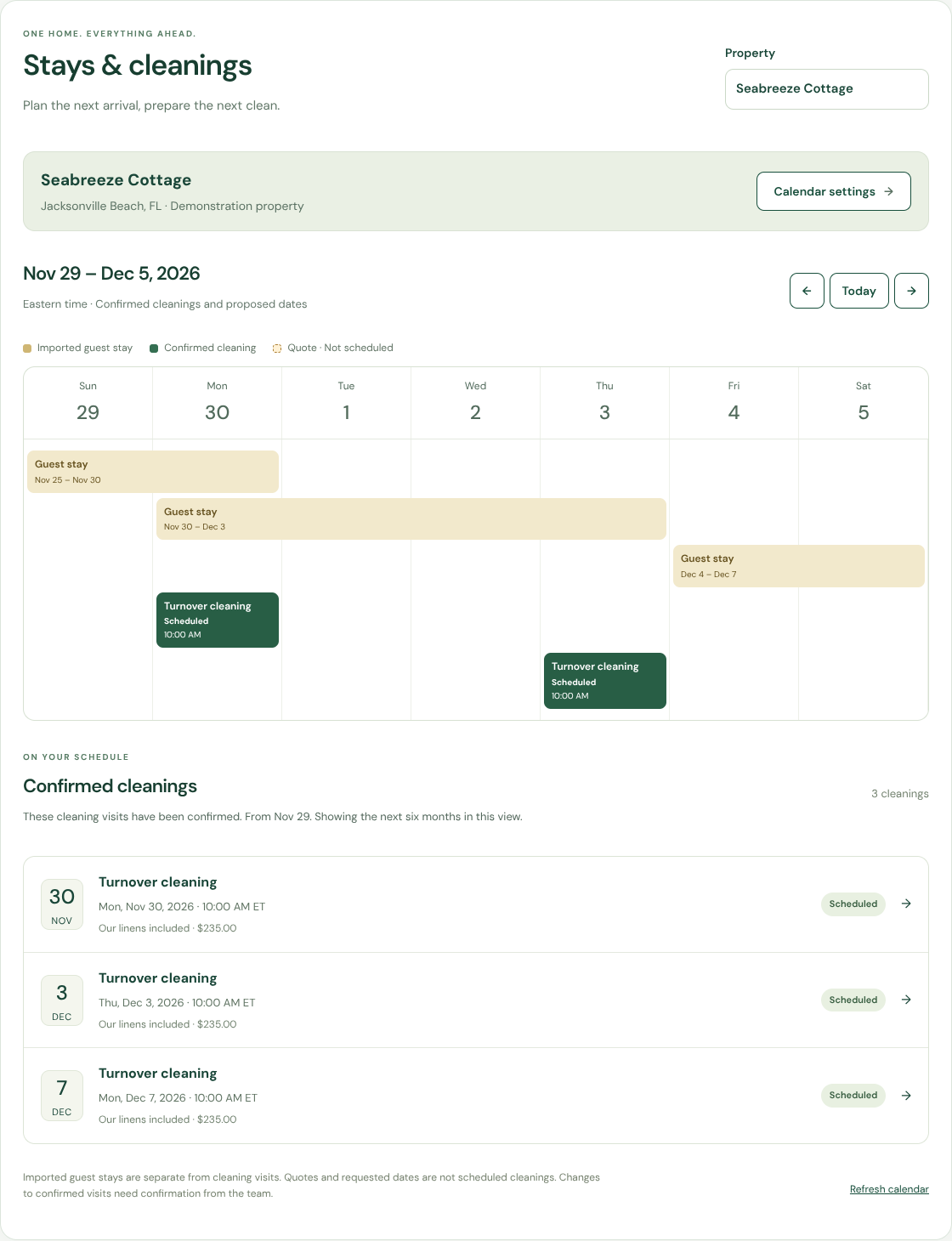
The calendar separates guest stays from cleaning visits. It also distinguishes confirmed work from quotes or proposed dates. A date on a quote is not a scheduled cleaning until the required approval steps are complete. That distinction is particularly useful when you are comparing options or waiting for an updated price.
Connect a booking calendar if automatic turnovers suit you
For supported standard iCal feeds, connect the private export link for the correct property and review the imported entries. Booking platforms and property management systems do not all describe stays and blocked dates in the same way. Review uncertain entries rather than assuming every date range represents a guest.
Connecting a feed does not, by itself, authorize cleaning charges. Optional automatic turnovers require the approved property quote, the necessary payment setup, any separate linen coverage, and your authorization. Authorized automatic cleaning charges are collected after the turnover is marked completed. This is different from the checkout for a manually booked turnover.
Before an automatic visit, the email check-in gives you a way to flag a blocked date, changes in checkout or arrival time, access details, and special requests. If you do not respond, the existing authorized cleaning remains the plan. Requested changes and any additional price still need review and approval.
Make a request against the right upcoming visit
Open the upcoming cleaning when you need a change. You can ask about a different time, a deeper clean, adding linens, or a special instruction. Put the request on the relevant visit so the team can assess the actual property, date, and approved scope.
- Timing: Provide the guest’s actual checkout and next arrival times, not just “a little later.”
- Extra work: Describe the rooms or tasks you want added so the team can quote them.
- Cancellation: Use the visit controls. Some eligible automatic visits can be cancelled directly; others need staff review.
- Access: Keep private entry details within the appropriate customer workflow, rather than sharing them in public comments.
A request is not confirmation of a new schedule. Check the response before promising an earlier arrival to a guest or assuming additional work is included.
Open the finished report and keep a copy
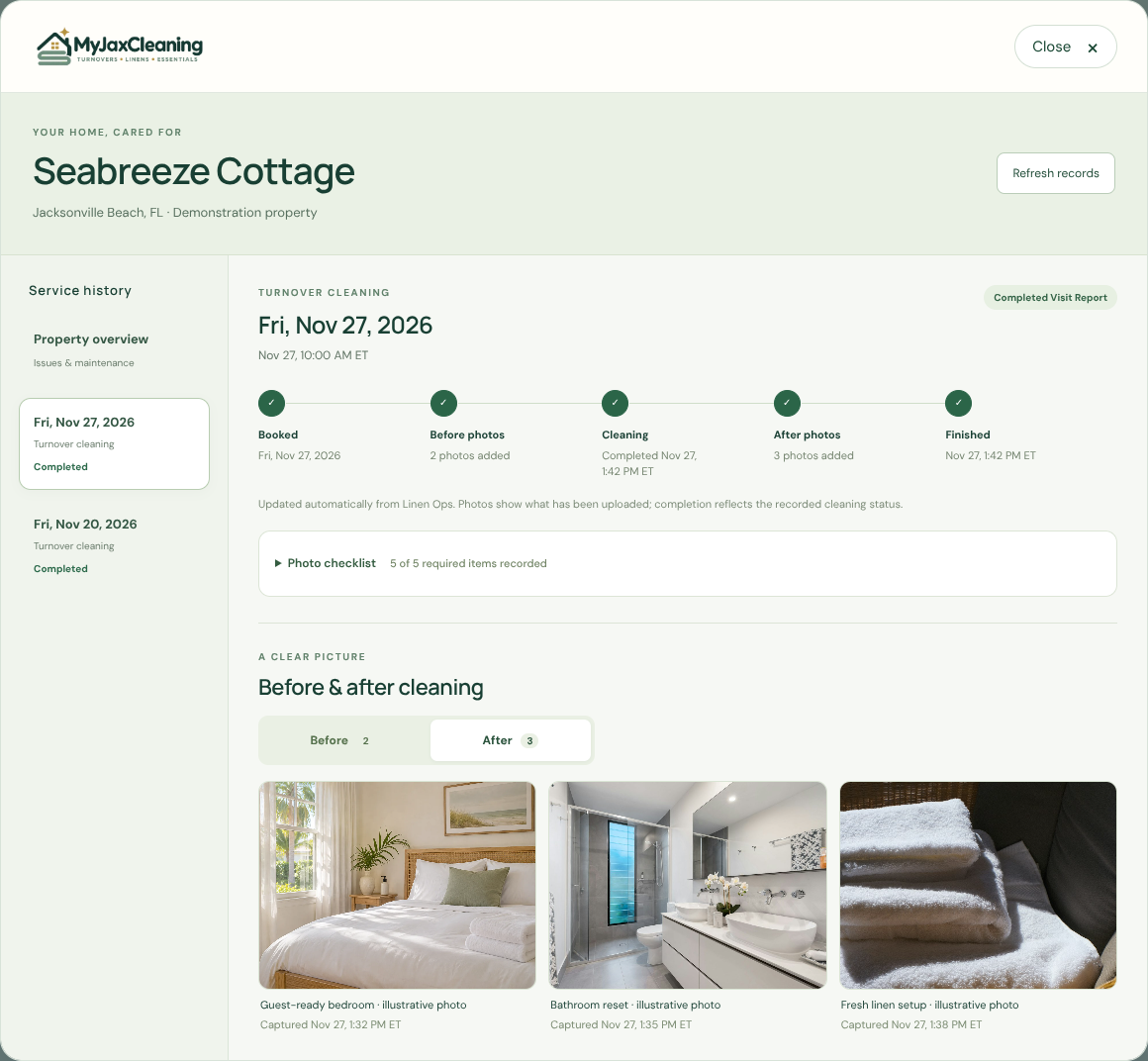
Each recorded visit connects to its property report. You can follow the cleaning progress, review the before-and-after photos, and see shared findings, damage reports, and maintenance recommendations when those records are available. A maintenance recommendation identifies something to consider; it does not mean a repair has been authorized or completed.
Download individual photos when you need a particular image, or save the visit photos together. The PDF cleaning report brings the visit details and available customer-facing records into a document you can retain. Keep original downloaded photos alongside the report if you are preparing documentation for a platform or insurer; the recipient decides which evidence and deadlines apply.
Keep your account and next steps current
Use Account for contact information and password changes, and My properties for the homes you manage. Optional text-alert preferences are separate from ordinary contact details. Text sending is being prepared for a new business number; the portal shows its availability, and email remains the current notification route.
Other cleaning types follow their own quote-and-approval process. An accepted specialty quote schedules the agreed visit, with invoice payment arranged separately. A recurring-cleaning request does not silently create an indefinite series of appointments.
Ready to begin? Request your property quote, or sign in to your customer account to review your existing homes and visits.